



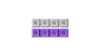





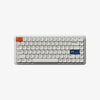


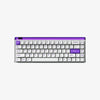


Talking about the high-end gaming keyboards, Centauri80 vs ROG Azoth Extreme Gaming Keyboard are the models that are distinguished by innovative features, high-quality build, and high-performance. Although the two are highly customizable and versatile, they serve various users as per their preferences. The MelGeek Centauri 60/80 Hall Effect Gaming Keyboard is made to suit gamers who require super-fast reactions and manageability, particularly in FPS games, whereas the ROG Azoth Extreme has a prestigious typing and multi-purpose wireless connection.
In this comparison, we will deconstruct their main characteristics, performance, and determine which of them is most suitable for various kinds of gamers.
Specs at a Glance
|
Specification |
Centauri80 |
ROG Azoth Extreme |
|
Size/Form Factor |
80% layout (83 keys) |
75% layout (approx. 81/82 keys) |
|
Dimensions |
~375 × 150 × 45 mm |
332 × 139 × 40 mm |
|
Weight |
~3540 g with packaging |
~2200 g with wrist rest |
|
Switch Type |
Hall Effect Magnetic (Flip King of magnetic white switch) |
ROG NX Mechanical (Snow / Storm) |
|
Polling Rate |
Up to 8000 Hz USB |
Up to 8000 Hz (USB & 2.4 GHz with Polling Rate Booster) |
|
Connectivity Options |
Wired USB (single‑mode) |
Wired USB, Bluetooth 5.1, RF 2.4 GHz |
|
OLED Screen |
Yes (1.78″, 368 × 448, 326 PPI Retina-level) |
Yes (1.47″ touchscreen) |
|
Price (Approx.) |
$359 |
From $424.99 |
Design and Build Quality
The Centauri80 vs ROG Azoth Extreme Gaming Keyboard are both made using quality materials, which increases their feel and longevity. We are going to look into the main design aspects of these two high-performance keyboards.
Case Material
The Centauri80 is constructed of a heavy alloy aluminium chassis, which is durable and gives it a fine feel. The high quality of this construction will guarantee its durability and the sleek and modern look. On the same note, the ROG Azoth Extreme uses a metal frame and an aluminium top plate, which provides the same degree of stiffness and a clean and smooth appearance. The two keyboards are well-made to be used extensively, and therefore, they are highly preferred by gamers as well as typists.
Mounting and Gasket Design
The Centauri80 employs the gasket mount design, which also isolates the switches from the case, lowers the vibrations and offers the typing experience a softer and more responsive feel. This makes it the best for gamers who value precision and comfort. The ROG Azoth Extreme, however, uses an adjustable gasket design where one can customise their typing feel. Firm or soft actuation: Sometimes you need a firm actuation, and other times you need a soft actuation; in any case, this feature allows you to adjust the experience to your own needs, whether you are a game player or a typist.
OLED Screen and Onboard Controls

The Centauri80 features a 1.78-inch OLED display that lets users show real-time information, images, and wallpapers in multiple formats, including JPG, PNG, and GIF, making the keyboard setup feel more dynamic and personalized. Slightly smaller at 1.47 inches in size, the ROG Azoth Extreme does provide a comparable OLED experience, with system notifications and customizable controls.
Both keyboards also feature dedicated onboard physical controls for faster, more intuitive adjustments. On the Centauri80, the control knob can be used for functions such as RGB lighting control and quick game profile customization, keeping performance settings close at hand. On the Azoth Extreme, the touch button is designed for convenient access to volume adjustment and key system settings, making everyday control feel smooth and immediate.
These high-quality design features have put the two keyboards in the perfect position of having good quality of build and customisation features that meet the tastes and preferences of various users.
Gaming Performance
In terms of gaming performance, the Centauri80 vs ROG Azoth Extreme Gaming Keyboard are both impressive in terms of responsiveness, although they perform optimally in other matters to satisfy the individual performance of gamers.
Input Latency
The Centauri80 provides Hall Effect magnetic switches to provide ultra-low input latency with keystrokes as short as 0.125 ms. This response time is ideal for competitive gamers, so that every press will be recorded immediately. As with the MelGeek Centauri80, all the action is responsive, and it is perfect in racing games.
The ROG Azoth Extreme also has low latency, particularly when it is connected through USB or its ROG Polling Rate Booster. The 8000 Hz polling rate of the keyboard allows it to communicate fast with the system, and it will provide a seamless gaming experience even during the most hectic moments.
Rapid Trigger and Dynamic Actuation Tests
The Centauri80 has Rapid Trigger and dynamic actuation. With the Hall Effect switches, the Centauri80 is capable of registering keys with high accuracy even in the case of a quick, repeated press. This is a considerable edge in the game, since it will enable gamers to perform several moves without any delays. The properties are particularly useful with fast-paced FPS and competitive games.
Conversely, although the ROG Azoth Extreme does not accept the Hall Effect switches, it still provides a great actuation consistency with its ROG NX mechanical switches. Its dynamic actuation and responsiveness in gaming are a miracle, but it cannot compare to the variability and precision as offered by the Hall Effect system of the Centauri80.
Polling
The two keyboards have 8,000Hz polling rates, implying that they can report key presses to your system 8,000 times a second. This high polling rate is very high, and this ensures that latency is minimised so that each keystroke is recorded within a short delay. In this regard, the MelGeek Centauri80 features a very responsive connection. On the same note, the ROG Azoth Extreme achieves a stable low latency with 8K polling, which can operate in wired and wireless modes.

Typing Feel and Sound
In their daily applications that are not related to gaming, both Centauri80 vs ROG Azoth Extreme Gaming Keyboard provide good typing experiences; however, they are different in the way they feel, respond, and are comfortable when used over lengthy periods.
Sound Profile
The MelGeek Centauri80 and its Hall Effect magnetic switches give a refined, smooth sound, between a normal mechanical click and a soft tactile thock. It is not too loud to be used in common areas or during lengthy typing times when noise can be a problem. The noise is also well balanced and clear without having sharp clacks, but it is still able to give a satisfying sound response.
The ROG Azoth Extreme, which is fitted with ROG NX mechanical switches, has a more established and slightly higher profile in the sound. Such switches have a stronger acoustic reaction - increased highs and reduced lows. The Azoth provides a more classic punch to the typists who prefer a more classic mechanical sound. One may have a slight increase in this profile, however, when typing fast or using it extensively.
Key Feel During Typing
The Centauri80 delivers a smooth, responsive typing feel with a more refined switch experience than a standard Hall Effect board. Its Flip king of magnetic white switches use a full-surround POM stem and high-rail construction to create ultra-smooth actuation with minimal scratchiness throughout the keystroke.
A raised contact base helps focus the bottom-out point, giving each press a deeper, cleaner sound profile that balances crisp clarity with a warm, satisfying resonance. Combined with the gasket mount design, the result is a keypress that feels cushioned, stable, and consistently smooth from top to bottom. The responsiveness contributes to the rhythm of typing, be it gaming, code writing or typing long passages.
ROG NX mechanical switches on ROG Azoth Extreme offer a nice bump and rebound actuation. The typing is solid and substantial, and there is definite feedback at every keypress. Although this is a more classic mechanical typing feel, it is a little harder than the smoother gliding of the Centauri80.
Comfort for Long Typing Sessions
The MelGeek Centauri80 is one that is comfortable when used over a long period. Smooth transitions combined with the slightly cushioned feel of the gasket mount and the fact that the actuation point remains consistent even on long typing or gaming sessions make fatigue less likely to occur. It is also more likely to remain more accurate and faster over long durations.
The build of the ROG Azoth Extreme is also comfortable during long typing sessions, though its firmer feedback can be a bit more exhaustive to some of its users after extended periods. Nevertheless, it fits perfectly well with typists who do not want to lose performance but still desire to have clearer feedback.
Connectivity and Workflow Flexibility
The connectivity and workflow features can significantly change the way a keyboard will fit into your setup, be it gaming at the desk, switching devices or getting productive. This is what the MelGeek Centauri80 and ROG Azoth Extreme have in this regard.

Wired‑Only Focus vs Tri‑Mode
MelGeek Centauri80 is a model that has a wired USB-C interface, aimed at stable, high-performance, but not the limitations of wireless modes. Having its connection wired, it has maintained ultra-low latency and available responsiveness that is competitive in gameplay and precision tasks.
By comparison, the ROG Azoth Extreme has a tri-mode connectivity with the ability to switch between wired USB, Bluetooth, and 2.4G RF wireless. This capability allows you to link to a variety of devices without disconnection, an excellent attribute for gamers, creators, or any other person who alternates between a PC, laptop, and mobile device.
Battery Life
The Centauri80, as it uses only a wired connection, is not subject to battery life, as you can have uninterrupted power and performance, as long as the keyboard is connected.
Conversely, the ROG Azoth Extreme is also wireless capable, and the battery life is remarkable in tri-mode keyboards. When used in the ROG SpeedNova 2.4 GHz wireless mode, it will provide over 1,600 hours of battery life, enabling you to play and work long hours without the need to recharge your device.
Fits Different Work Setups
The wired design of the MelGeek Centauri80 provides the most comparable input performance in competitive gaming or dedicated workstations and environments where latency is the biggest concern. It is simple enough to maintain clean and reliable setups.
Meanwhile, the tri-mode system of ROG Azoth Extreme is designed to meet the needs of the user who is flexible. The Azoth fits well whether you want to connect to a gaming computer, a work laptop through Bluetooth or use a wireless receiver so that you have a clean desk. It is a good option in a multi-device context, with streamers, or any person who appreciates the freedom to be able to use it in their workflow.
Software and Customisation
Both Centauri80 vs ROG Azoth Extreme Gaming Keyboard have good customisation capabilities, although the software is oriented to different users.
MelGeek Hive Driver for Trigger Tuning and Fast Competitive Setup
The MelGeek Hive Driver enables a very granular control of the Centauri80, including tuning of the triggers and adjustment of the actuation, as well as macro settings. It is aimed at gamers who desire fast and responsive manipulations and competitive playing without distractions.
Armoury Crate for Profiles, OLED Customisation, and Ecosystem Control
Armoury Crate is the overall software of Alex ASUS to control the ROG Azoth Extreme and provide detailed control of lighting, macros, and profiles. It can also be combined with other ROG peripherals to enjoy the synchronised experience, though the interface may be more complicated.
Which Software Feels Easier to Live With
MelGeek Hive is less complex and dedicated to keyboard-specific adjustments, which are suitable for quick constructions. Armoury Crate has more features, but is designed more towards those with multiple ROG products who prefer to have their keyboard, mouse, and devices all controlled together; it is less simple for those who just want to customise their keyboard.
Who Should Buy the Centauri80?

The MelGeek Centauri80 is a strong fit not only for FPS players and fans of Hall Effect switches, but also for content creators and desk setup enthusiasts who value both performance and design. In games that require lightning responsiveness and accuracy, its Hall Effect magnetic switches have instant registration and a latency of 0.125 ms. The rapid trigger and dynamic actuation features allow you to adjust the actuation sensitivity, giving you an edge in gaming.
The Centauri80 is designed for performance with the MelGeek Hive software, allowing easy customisation of triggers, macros, and lighting. The Centauri80 would be the best fit in case you care about low latency and a customizable performance that is not distracting.
Who Should Buy the ROG Azoth Extreme?
ROG Azoth Extreme is ideal among users who demand a high-quality typing experience and wireless flexibility. Its ROG NX mechanical switches have a tremendous touch, regardless of whether you are typing a long document or playing a game.
It has a tri-mode connection (wired, Bluetooth, and 2.4GHz wireless) and is ideal for multi-device connections. The control knob and OLED display make it easy to find the settings and add a personal touch. In case your desire is excellent localisation of a structure, wireless mobility, and fashionable functionality, Azoth Extreme is the suitable option.
Conclusion
An exceptional value of MelGeek Centauri 60/80 Hall Effect Gaming Keyboard has the FPS players and every other person who appreciates precision, ultra-low latency and actual performance calibration. Centauri80 is a great choice among performance users with its Hall Effect switches and high level of customisation that gives it a competitive advantage in play and responsiveness during routine functionality. The ROG Azoth Extreme targets users seeking a premium typing experience with multi-device wireless versatility. If speed and responsiveness are your top priorities, the MelGeek Centauri80 is the clear winner.
Frequently Asked Questions
Can the Azoth run in wired 8 kHz like the Centauri?
Yes, the ROG Azoth Extreme can use an 8,000 Hz polling rate in the wired mode to achieve low latency and high response speed, as the Centauri80. This guarantees ultra-fast gaming on wired and wireless modes.
Do both keyboards support ISO layouts?
Both keyboards may support ISO layouts depending on the regional model. The specific layout options may be verified on the product listing or the authorised retailers.
Is the Hall Effect better than a premium mechanical keyboard for gaming?
Hall Effect offers a contactless actuation with faster speeds, which is ideal for extremely low latency, perfect for competitive gaming. Nonetheless, high-quality mechanical switches such as ROG NX have a more classic feel, which is highly responsive to both typing and gaming.
Can the Centauri80 still work well for typing and daily use?
The Centauri80 is both a gaming and typing keyboard, with a smooth, responsive feel that is ideal for long typing. Its Hall Effect switches are reliable with regard to feedback and comfort in everyday activity.
Which keyboard is better for wireless and multi‑device setups?
ROG Azoth Extreme is more suitable when using multiple devices, as it is tri-mode (wired, Bluetooth, and 2.4 GHz wireless). It enables you to move easily to the device, and as such, it is ideal for users who require the flexibility and versatility of wireless.